0
Моя корзина
Каталог

Категории товаров

Категории товаров

0
Моя корзина

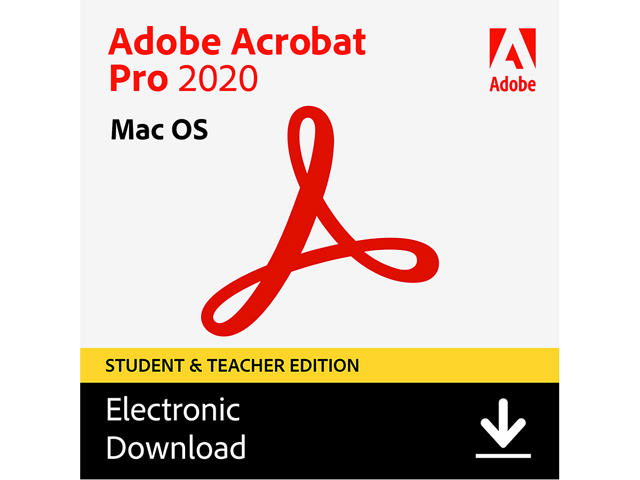
Adobe Acrobat Pro 2020 Student & Teacher (Verification Required) — MAC Download

0
Код товара: 32-505-581
Предложение актуально на:15/05/2025
26,175.31 руб.
Disclaimer: Important information regarding validation for Adobe Academic Products: Please visit (https://www.identit-e.com/adobe) to validate your Adobe Academic Product. Follow the onscreen instructions to send your proof of academic eligibility. If you have not heard from Adobe within four business days after sending your identification, please contact Adobe Customer Service: (http://helpx.adobe.com/ contact.html). If your product is a pre-order, you will be notified at this email address when your pre-order item is available for download or ship. Program Purchasing Restrictions: You may purchase only one license per platform of any Adobe Student and Teacher Edition product per year. Adobe Student and Teacher Edition products may be used only on your privately owned computer and may not be resold. Eligible persons include: University and college students — students …
Доставка из USA ориентировочно 17.02.2026. Пошлина: 3,926.30 руб.
В наличии

12 в наличии (может быть предзаказано)

В избранноеВ избранном0
В сравнениеДобавлено в сравнение0
16 человек смотрят это товар.

Adobe Acrobat Pro 2020 (Student & Teacher Edition)

Adobe Acrobat Pro 2020 (Student & Teacher Edition)

Acrobat 2020 is the latest perpetual desktop version of Acrobat. It simplifies everyday PDF tasks and includes many productivity enhancements when working with PDFs from your desktop.

* Works only with Mac OS

What’s new in Acrobat Pro 2020

New Home view

The new Home view helps you stay organized and productive—it’s a single place for you to organize, manage, and search for all your PDFs.

  • Recent Files list: Displays your recent files opened for viewing from your computer, Document Cloud storage, or third-party storage like OneDrive, Dropbox, Box, and SharePoint.
  • Recommended tools: Helps you discover top Acrobat tools like Edit PDF, Create PDF, Combine PDFs, and more.
  • Search box: Lets you search all your Document Cloud files and the files sent or received for viewing, reviewing, or signing.
  • Context pane: Helps you take actions on files across all Home view with context-sensitive menus, and check the status of participants and history of activities for shared documents.

img

A. Recent files B. Recommended tools C. Search files D. Context pane

View MIP-protected PDFs in Acrobat 2020 and Reader 2020

Now you can use Adobe Acrobat 2020 and Acrobat Reader 2020 Windows and Mac desktop applications to open files protected with MIP (Microsoft Information Protection) solutions including Azure Information Protection (AIP) and Information Protection using Office 365.

Acrobat 2020 and Acrobat Reader 2020 auto-detect a MIP-protected file and prompts you to download the corresponding plug-in from the plug-in download page. Once you download and install the plug-in, the protected files open like any other PDF in Acrobat or Reader.

Color customization capability in the Fill & Sign tool

You can now choose your desired color to fill the PDF form and sign it using the Fill and Sign tool in Acrobat 2020. To change the color, click the Color button in the Fill & Sign toolbar.

By default, the signature’s color is black. To retain the default color, deselect the Retain Original Color For Signatures checkbox.

img

Run OCR on scanned documents with live text

With Acrobat 2020, you can run OCR on a scanned PDF that contains images with live text on them.

1.Open the scanned PDF in Acrobat 2020.

2. Go to Tools > Enhance Scan > Recognizable Text > In This File.

3. Click Settings in the toolbar. The Recognize Text dialog box is displayed.

4. In the Output drop-down list, choose Searchable Image or Searchable Image (exact) and click OK.

5. Click Recognize Text in the toolbar.

Improved experience with DirectInk

Improved Pen tool leveraging DirectInk technology allows you to write and draw more smoothly and accurately directly on the document without selecting a tool.

Sign PDF files with DirectInk

New support for DirectInk in the Signatures Panel of the Certificates app offers a more natural experience and gives you more control of how your signature looks when signing on Windows 10 devices.

img

PRO ONLY Preflight enhancements and PDF/UA validation in preflight

  • Preflight Libraries: Preflight Profiles, Fixups, and Checks are now well organized in Libraries.
  • Preflight Variables: Variables allow you to dynamically adjust Profiles, Checks, and Fixups when they are applied. Variables can be used when editing Profiles, Checks, or Fixups wherever the orange triangle shows up. It is also possible to filter for existing objects using Variables.
  • Preflight supports the new Ghent PDF Workgroup Specification 2015: The new GWG specifications are based on PDF/X-4, and support native transparency as well as media neutral RGB workflows.
  • PDF/UA validation in Preflight: Preflight now makes it possible to fix common accessibility problems and to validate against the international standard for Universal Accessibility PDF/UA.

PRO ONLY Improved Accessibility feature updates and workflows

Improved Accessibility features in Acrobat Pro 2020 make it easier for people with disabilities to use PDF documents and forms, with and without the aid of assistive technology software and devices.

PRO ONLY Touch bar built into MacBook Pro

Functionalities for the touch bar built into MacBook Pro help you work more efficiently on MacBook Pro computers.

Детали

Рейтинг лучших продавцов

#3 in Academic Software — Download

Отказ от ответственности

Important information regarding validation for Adobe Academic Products:

Please visit (https://www.identit-e.com/adobe) to validate your Adobe Academic Product.
Follow the onscreen instructions to send your proof of academic eligibility.

If you have not heard from Adobe within four business days after sending your identification, please contact Adobe Customer Service: (http://helpx.adobe.com/contact.html).
If your product is a pre-order, you will be notified at this email address when your pre-order item is available for download or ship.

Program Purchasing Restrictions:
You may purchase only one license per platform of any Adobe Student and Teacher Edition product per year. Adobe Student and Teacher Edition products may be used only on your privately owned computer and may not be resold.

Eligible persons include:
University and college students — students enrolled at a higher education institution defined as an accredited public or private university or college (including community, junior, or vocational college) that grants degrees requiring not less than the equivalent of two years of full-time study.
Primary and secondary school students — students enrolled at an accredited public or private primary or secondary school providing full-time instruction.
Faculty and staff — teachers and staff employed by an accredited primary or secondary school, public or private university or college, school district, or board of education (including emeritus status professors)
Homeschooled students and their teachers — students and teachers as defined by state homeschooling regulations.

For detailed information regarding acceptable forms of academic proof of eligibility, please refer to the FAQ (http://helpx.adobe.com/x-productkb/policy-pricing/education-faq.html).

Бренд

Adobe

Модель

65312070

Имя

Acrobat Pro 2020 Student & Teacher (Verification Required) — MAC Download

Версия

Поддерживаемые операционные системы

Системные требования

macOS
Intel processor
macOS v10.13, mac OS v.10.14, or macOS v10.15
2GB or RAM
2.75GB of available hard-disk space
1024×768 screen resolution

Упаковка

Характеристика

Be more productive and organized. Adobe Acrobat Pro 2020 delivers the tools you need to create, edit, fill, sign, and protect PDF documents. Quickly convert documents to PDF from Windows and macOS. Turn paper documents into editable PDFs. And manage all your PDF files from the centralized Home view.

Create PDFs from Windows and macOS — Quickly and reliably convert documents to standards — compliant PDFs from Windows and macOS.

Export PDFs to Microsoft Office 365 formats — Convert PDFs to Word, Excel, or PowerPoint formats while preserving fonts, formatting, and layouts.

Enhance accessibility — Take advantage of intuitive accessibility features and workflows to make it easier for people with disabilities to use PDF documents and forms with or without the help of assistive technology software and devices.

Manage all your work from one place — Organize, manage, and search all your PDFs from the centralized Home view.

Create interactive PDFs — Add video, sound, and interactive content to transform your PDFs into engaging experiences.

Customize your tools — Stay organized with color customization of Fill & Sign tools like Add Text, Add Checkmark, and Sign.

Open Microsoft Information Protection (MIP) files — Use Adobe Acrobat 2020 to open files protected with Microsoft Information Protection solutions.

Edit scanned documents — Run optical character recognition (OCR) on scanned paper documents to turn them into editable PDFs.

Easily compare files — Compare two versions of a PDF using an easy — to — scan results summary to quickly see what’s changed.

Work with Dropbox, Box, and OneDrive — Access, edit, and store files in your Dropbox, Box, or Microsoft OneDrive account while working in Acrobat Pro 2020.

Prepare PDFs for high — quality printing — Use preflight libraries to get customized sets of profiles, checks, and corrections.

Delete sensitive information — Find and get rid of text, images, or even metadata permanently with easy — t

Дата появления в продаже

June 11, 2020

Ссылка на описание модели

https://www.adobe.com/

Модель модификации

65312070

Артикул (SKU)

32-505-581

Ссылка на предложение поставщика

https://www.newegg.com/p/32-505-581

Отгрузка из

Состояние

Новый

Название производителя

Adobe Acrobat Pro 2020 Student & Teacher (Verification Required) — MAC Download

Dimensions
Weight 0.45 кг
Dimensions 2.54 × 2.54 × 2.54 см

User Reviews

0.0 out of 5
0
0
0
0
0

There are no reviews yet.

Only logged in customers who have purchased this product may leave a review.

С этим товаром покупают
  • ×
    Open full product page
    0
    0
    99999 в наличии (может быть предзаказано)
    3,793.20 руб.
  • ×
    Open full product page
    0
    0
    99999 в наличии (может быть предзаказано)
    7,296.86 руб.
  • 53%
    ×
    Open full product page
    0
    0
    99999 в наличии (может быть предзаказано)
    Первоначальная цена составляла 4,668.82 руб..Текущая цена: 2,217.08 руб..
  • ×
    Open full product page
    0
    0
    99999 в наличии (может быть предзаказано)
    8,171.32 руб.